
Fahrzeughistorie und Build Sheet für jeden Restomod abrufen
Sie möchten einen Restomod kaufen, verkaufen oder bauen? Führen Sie einen... Restomod-VIN-Prüfung Um die verfügbare Fahrzeughistorie einzusehen und das klassische Build Sheet zu rekonstruieren, überprüfen Sie die Werksangaben, den Fahrzeugbrief, Unfallberichte und weitere Details, um eine fundierte Entscheidung zu treffen.


Was ist eine Restomod-VIN-Prüfung?
Eine Restomod-VIN-Prüfung nutzt die Fahrzeugidentifikationsnummer (FIN), um zwei Datensätze abzurufen: entweder das originale Build Sheet oder den Fahrzeughistorie . Sie funktioniert sowohl für klassische als auch für moderne Fahrzeuge vor 1981.
So müssen Sie nicht mehr raten, wie ein Restomod ursprünglich aussah. Egal, ob Sie einen komplett aufgebauten Restomod kaufen oder verkaufen oder selbst einen aus einem Spenderfahrzeug aufbauen – mit diesem Tool erhalten Sie sofort präzise Daten zu Werksspezifikationen, Fahrzeugpapieren und der verfügbaren Historie.
Warum ein Restomod eine spezielle Fahrgestellnummernprüfung benötigt
Die meisten modernen VIN-Prüfgeräte sind für Fahrzeuge ausgelegt, die nach 1981 hergestellt wurden. Restomods basieren oft auf Oldtimer Modellen aus der Zeit vor 1981, sodass Standard-VIN-Decoder wichtige Informationen übersehen oder falsch lesen können.
Moderne VIN-Tools erfassen Daten Oldtimer nicht.
Fahrzeugidentifikationsnummern (VINs) von Fahrzeugen vor 1981 sind oft kürzer als das heutige 17-stellige Format. Standard-Decoder erwarten das moderne Layout und überspringen oder interpretieren daher Oldtimer Daten falsch.
Warum ist der Kauf von Restomods ohne vorherige Prüfung besonders riskant?
Restomods kombinieren eine alte Karosserie mit neuen Teilen. Diese Kombination erschwert es, festzustellen, was original ist und was ausgetauscht oder aufgerüstet wurde.
Fahrzeughistorie vs. Build Sheet : Was ist der Unterschied?
Sie können die beiden Datensätze mit unserem Restomod-VIN-Abfragetool abrufen, aber sie beantworten unterschiedliche Fragen. Der eine zeigt, wie das Auto gebaut wurde, der andere, was nach Verlassen des Werks mit ihm geschah. Hier ist ein Vergleich:
Fahrzeughistorie Report | Build Sheet | |
Cover | Lebensdauer des Autos nach der Produktion. | Informationen zur Werksfertigung |
Shows | Titel, Kilometerstand, Unfälle, Eigentumsverhältnisse, Diebstahl, Versteigerung, Pfandrechte und mehr | Motor, Ausstattung, Optionen, Lackfarbe, sonstige Werksdetails |
Am besten geeignet für | Kauf, Verkauf, Betrugsprüfungen | Restaurierung und Provenienz |
Antworten | Was ist seitdem damit geschehen? | "Woraus wurde es gebaut?" |
Restomod VIN-Historie oder Build Sheet : Welchen Datensatz benötigen Sie?
Die Wahl zwischen einem Restomod Fahrzeughistorie und Build Sheet hängt von Ihren Zielen ab. Beide Dokumente liefern unterschiedliche Details, die Ihnen beim Kauf, Aufbau oder Verkauf eines Restomods helfen.
Beim Kauf
Ein Fahrzeughistorie -Bericht hilft Ihnen, die Vorgeschichte eines Restomods vor dem Kauf zu überprüfen, Risiken zu minimieren und eine fundiertere Entscheidung zu treffen.
Auf mögliche Warnsignale achten
Prüfen Sie vor dem Kauf eines komplett restaurierten Restomods die verfügbaren Unfall-, Eigentums-, Kilometer- und Diebstahlakten , um mögliche Probleme zu erkennen.
Fahrzeugidentität bestätigen
Vergleichen Sie die Fahrzeugidentifikationsnummer (VIN) mit den verfügbaren Aufzeichnungen und Unterlagen, um Unstimmigkeiten festzustellen und zu überprüfen, ob die Fahrzeugdaten des Verkäufers übereinstimmen.
Beim Bauen
Ein Build Sheet hilft Restomod-Bauern, die ursprünglichen Werksspezifikationen eines Spenderfahrzeugs zu verstehen, bevor sie es modifizieren und Upgrades für das Projekt planen.
Originalspezifikationen identifizieren
Bevor Sie mit den Umbauten beginnen, sollten Sie den Originalmotor, die Innenausstattung, die Lackfarbe und die Werksoptionen überprüfen, um die Konfiguration des Spenderfahrzeugs zu verstehen.
Planen Sie Ihr Bauvorhaben
Nutzen Sie die Werksspezifikationen als Referenz bei der Auswahl von Upgrades, der Nachverfolgung von Änderungen und der Dokumentation des Projekts für zukünftige Wartungsarbeiten oder den Wiederverkauf.
Beim Verkauf
Ein Fahrzeughistorie -Bericht hilft Verkäufern, die Vorgeschichte eines Restomods zu erläutern, Fragen von Käufern zu beantworten und nützliche Unterlagen bereitzustellen, die einen transparenten Verkauf unterstützen.
Käufervertrauen aufbauen
Teilen Sie verfügbare Historieninformationen, um Käufern zu helfen, die Vorgeschichte des Fahrzeugs zu verstehen, Bedenken auszuräumen und mehr Sicherheit beim Kauf zu gewinnen.
Begründen Sie Ihren Angebotspreis
Kombinieren Sie historische Aufzeichnungen mit Baubelegen, Restaurierungsfotos und Details zu den Modernisierungen, um den Zustand des Fahrzeugs zu erläutern und Ihren Preiswunsch zu untermauern.
Was ist im Restomod-Geschichtsbericht enthalten?
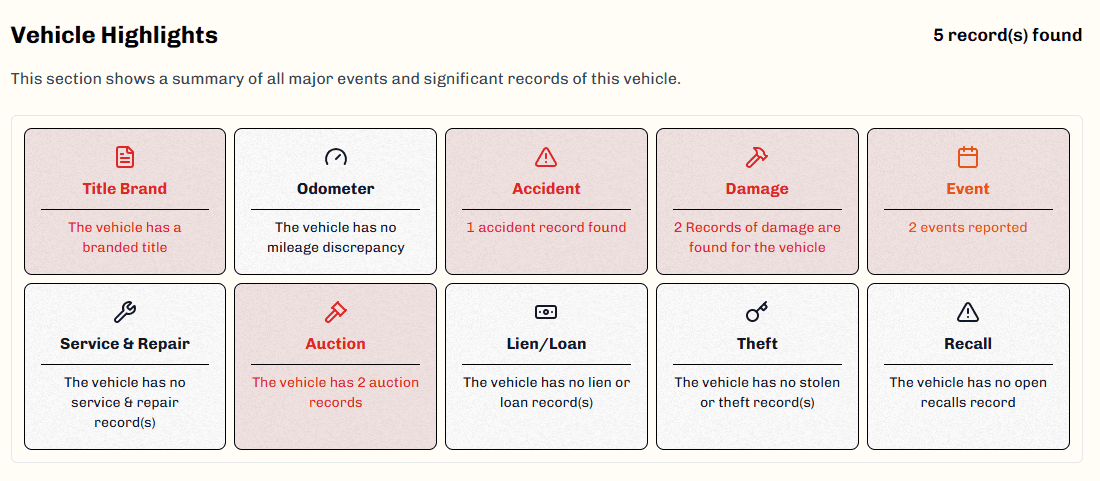
A Oldtimer-Fahrzeughistorie report zeigt, was mit dem Auto nach Verlassen des Werks geschah. Folgendes ist typischerweise enthalten.
Detaillierte Werksspezifikationen
Sehen Sie sich das ursprüngliche Baujahr, die Marke, das Modell und die werksseitig installierte Ausstattung des Fahrzeugs an, wie sie bei der Produktion dokumentiert wurden.
Auktionsprotokolle & Fotos
Prüfen Sie frühere Auktionsangebote und Fotos, die Aufschluss über Zustandsänderungen oder die Wiederverkaufshistorie geben können.
Titelstatus und Marken
Finden Sie heraus, ob der Titel sauber, beschädigt, wiederaufgebaut oder aufgrund anderer Probleme gekennzeichnet ist.
Verkaufsunterlagen
Prüfen Sie die aufgezeichneten Verkaufsdaten und -preise, um die Marktgeschichte des Fahrzeugs zu verstehen.
Kilometerstandhistorie
Vergleichen Sie die gemeldeten Kilometerstände im Laufe der Zeit, um mögliche Kilometerzählermanipulationen oder Lücken aufzudecken.
Unfall- und Schadensberichte
Siehe gemeldete Unfälle, strukturelle Schäden oder größere Reparaturen, die mit der Fahrzeugidentifikationsnummer (VIN) in Verbindung stehen.
Diebstahl- und Wiederbeschaffungsstatus
Prüfen Sie, ob das Fahrzeug jemals als gestohlen gemeldet oder nach einem Diebstahl wiedergefunden wurde.
Eigentumsurkunden
Sehen Sie nach, wie viele Besitzer das Fahrzeug hatte und wann die Besitzerwechsel registriert wurden.
Pfand- und Darlehensakten
Prüfen Sie, ob aktive Pfandrechte oder Darlehen bestehen, die einen reibungslosen Eigentumsübergang beeinträchtigen könnten.
Was Sie aus dem Restomod Build Sheet lernen können
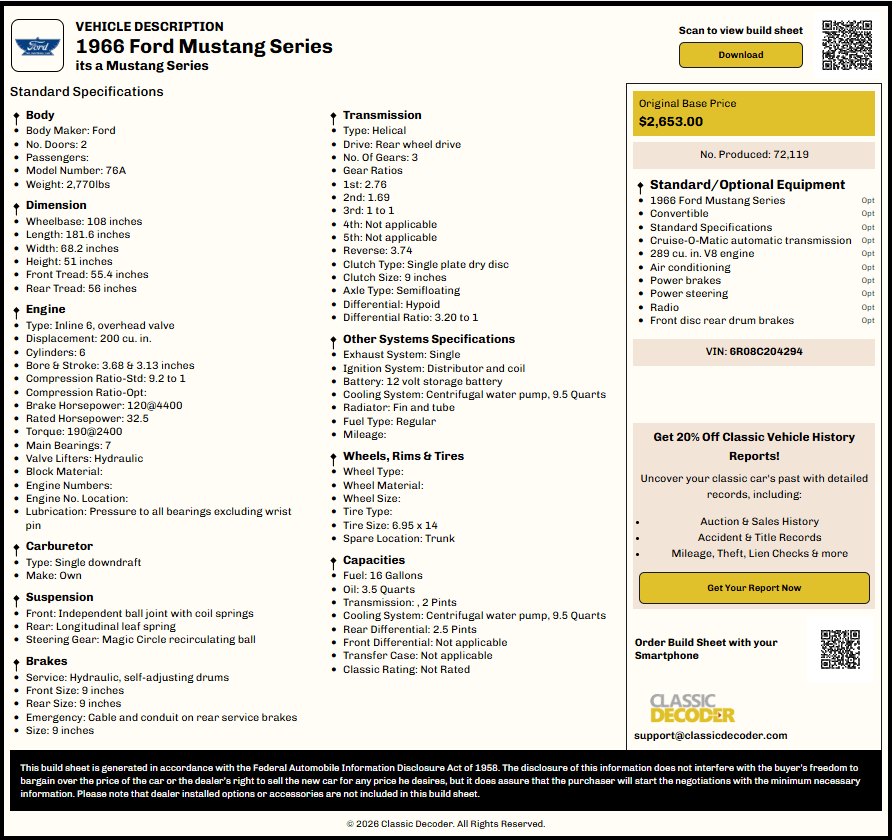
Ein Build Sheet zeigt, wie das Auto das Werk verlassen hat. Hier sehen Sie, welche Details ab Werk üblich sind.
Jahr, Marke, Modell
Bitte bestätigen Sie das genaue Baujahr, die Marke und das Modell, die dieser Fahrgestellnummer ursprünglich zugeordnet wurden.
Werksoptionen
Sehen Sie nach, welche Werksoptionen und Pakete beim Bau des Fahrzeugs ausgewählt wurden.
Motordaten
Überprüfen Sie den ursprünglichen Motorcode, die Größe und die Konfiguration direkt in den Werksunterlagen.
Übertragung
Finden Sie heraus, ob das Auto ab Werk mit einem manuellen oder automatischen Getriebe ausgestattet war.
Suspension
Überprüfen Sie die ursprüngliche Fahrwerkskonfiguration, einschließlich der Federn und der werkseitigen Fahrzeughöhenvorgaben.
Vergaser
Siehe die Angaben zum werkseitig verbauten Vergasertyp und den Spezifikationen des Originalmotors.
Kapazitäten und Abmessungen
Prüfen Sie die vom Hersteller angegebenen Flüssigkeitskapazitäten, Gewichte und Abmessungen für das Originalfahrzeug.
Ursprünglicher Basispreis
Sehen Sie den ursprünglichen Basispreis des Wagens, so wie er das Werk verlassen hat.
Räder, Felgen und Reifen
Prüfen Sie die Werksangaben zu Rädern, Felgen und Reifen der Originalausstattung.
So funktioniert unser Restomod-VIN-Suchtool
Den Historienbericht oder Build Sheet Ihres Restomods zu erhalten, dauert nur wenige Minuten. Hier erfahren Sie Schritt für Schritt, wie es funktioniert.
- 1
Geben Sie die Restomod-Fahrgestellnummer ein.
Geben Sie die Fahrzeugidentifikationsnummer (VIN) in das Formular oben auf der Seite ein. Um ein Build Sheet zu erhalten, wählen Sie zuerst „ Build Sheet anfordern“. - 2
Formular absenden
Senden Sie das Formular ab, um sofort eine Vorschau mit Baujahr, Marke, Modell, Ausstattungsvariante, Getriebe und Motor zu erhalten. Für diesen Schritt ist keine Zahlung erforderlich. - 3
Holen Sie sich Ihre Restomod-Fahrzeughistorie oder Build Sheet
Leisten Sie die erforderliche Zahlung, um den Historienbericht oder Build Sheet einzusehen und herunterzuladen, je nachdem, welche Informationen Sie suchen.
Was eine VIN-Prüfung eines Restomods Ihnen nicht verraten kann
Keine Fahrgestellnummernprüfung ist perfekt, auch nicht bei Oldtimer . Hier ist, was unsere Restomod-VIN-Prüfung Das Tool kann dies nicht selbstständig bestätigen.
Jede Änderung
Eine Fahrgestellnummernprüfung eines Restomods listet nicht alle während des Umbaus hinzugefügten Sonderteile auf. Manche Änderungen bleiben undokumentiert.
Qualität der Arbeit
Ein Fahrzeughistorie -Bericht kann Ihnen nicht sagen, ob die Restomod-Arbeiten gut ausgeführt wurden. Dafür ist nach wie vor eine physische Inspektion erforderlich.
Aktueller mechanischer Zustand
Die verfügbaren Historien- und Baudaten geben keinen Aufschluss darüber, wie das Fahrzeug heute fährt. Eine Probefahrt vor dem Kauf ist daher unbedingt empfehlenswert.
Vollständige Restaurierungsgeschichte
Nicht jeder Reparatur- oder Restaurierungsschritt wird dokumentiert. Manche Arbeiten erfolgen ohne Papierkram oder öffentliche Aufzeichnungen.
Originalität oder übereinstimmende Nummern
Eine VIN-Abfrage bei einem Restomod-Fahrzeug kann den Übereinstimmungsstatus der Nummern nicht allein bestätigen. Ein geschulter Gutachter sollte dies persönlich überprüfen.
Ersatzteilbeschaffung
Eine VIN-Prüfung gibt keine Auskunft darüber, woher die Zubehörteile stammen oder ob sie den Sicherheitsstandards entsprechen.
Wo finde ich die Fahrzeugidentifikationsnummer (VIN) bei einem Restomod?
Bei älteren Fahrzeugen kann die Suche nach der Fahrgestellnummer eines Restomods schwieriger sein, da Fahrzeuge vor 1981 je nach Hersteller, Modell und Produktionsjahr unterschiedliche Identifikationsformate und -orte verwendeten.
Oldtimer vor 1950
- ▶Überprüfen Sie den Rahmen bzw. das Chassis, die Spritzwand und den Motorraum.
- ▶Bei einigen frühen Ford Modellen sind die Seriennummern auf dem Motor oder dem Rahmen eingestanzt.
Oldtimer Autos der Jahre 1950–1959
- ▶Schauen Sie sich den Türrahmen auf der Fahrerseite, die Spritzwand, den Rahmen oder den Motorraum an.
- ▶Bei manchen Modellen sind die Identifikationsnummern an weniger sichtbaren Stellen angebracht.
Oldtimer der Jahre 1960–1967
- ▶Überprüfen Sie den Türrahmen, das Armaturenbrett, die Spritzwand oder den Rahmen auf der Fahrerseite.
- ▶Bei Chevrolet Corvettes der Baujahre 1963–1967 befindet sich der Fehler unterhalb des Handschuhfachs an der Stützstrebe des Armaturenbretts.
Oldtimer Autos der Jahre 1968–1980
- ▶Überprüfen Sie das Armaturenbrett auf der Fahrerseite durch die Windschutzscheibe, den Türrahmen, die Spritzwand oder den Rahmen.
- ▶Bei vielen Chevrolet Camaros befindet sich die Fahrgestellnummer (VIN) auf dem Armaturenbrett, während sie bei Corvettes der Baujahre 1968–1980 typischerweise am Windschutzscheibenpfosten auf der Fahrerseite angebracht ist.
Warum sollten Sie sich für unser Restomod-VIN-Suchtool entscheiden?
Es gibt viele VIN-Tools auf dem Markt. Hier erfahren Sie, warum sich Besitzer, Käufer und Verkäufer von Restomod-Fahrzeugen für unseres entscheiden.
Genaue Oldtimer Daten entschlüsseln und darauf zugreifen
Wir sind spezialisiert auf Oldtimer und Fahrzeuge vor Baujahr 1981, bei denen die meisten modernen VIN-Tools an ihre Grenzen stoßen.
Sofortige Abfrage von Historie und Build Sheet
Erhalten Sie innerhalb von Sekunden eine kostenlose Vorschau der Fahrzeugspezifikationen; vollständige Berichte stehen Ihnen direkt nach dem Kaufabschluss zur Verfügung.
Unterstützung für Fahrzeugidentifikationsnummern (VINs) vor 1981 und neuere Fahrzeuge
Unser Tool ist so konzipiert, dass es sowohl kurze klassische VINs (5-14 Ziffern) als auch moderne Standard-VINs mit 17 Zeichen lesen kann.
Kundensupport rund um die Uhr
Wenn Sie Fragen zu Ihrem Bericht oder zur Funktionsweise unserer Tools haben, steht Ihnen unser Support-Team jederzeit gerne zur Verfügung.
Restomod-Marktüberblick: Warum die Nachfrage weiter steigt
Der Restomod-Markt wird im Jahr 2026 ein Volumen von rund 7,9 Milliarden US-Dollar erreichen und wächst weiterhin rasant. Branchenanalysten prognostizieren, dass der weltweite Markt Oldtimer Restaurierung und Restomod-Dienstleistungen innerhalb des nächsten Jahrzehnts 14,4 Milliarden US-Dollar erreichen wird.
Restomod-Umbauten machen bereits fast 40 % des Marktes aus, wobei Muscle-Cars die Nachfrage anführen. Da immer mehr Käufer klassisches Aussehen mit moderner Zuverlässigkeit wünschen, steigen die Preise und die Verarbeitungsqualität von Restomods jährlich. Angesichts steigender Preise ist es wichtiger denn je, die Details und die Historie eines Fahrzeugs zu überprüfen.
Prüfen Sie jetzt sofort Ihre Restomod-Fahrzeugidentifikationsnummer (VIN).
Kaufen, verkaufen oder bauen Sie einen Restomod nicht auf gut Glück. Überprüfen Sie jetzt die Fahrgestellnummer, um in weniger als einer Minute das klassische Build Sheet und/oder Fahrzeughistorie zu erhalten.
Häufig gestellte Fragen zur Restomod-Fahrzeugidentifikationsnummer-Prüfung
Ja, Sie können einen Restomod anhand der Fahrgestellnummer (VIN) überprüfen. Unser Tool durchsucht die verfügbaren Fahrzeughistorie und Werksdatensätze, die mit dieser spezifischen Fahrgestellnummer verknüpft sind, einschließlich klassischer und vor 1981 gebauter Fahrzeuge.
Ja, ein Restomod Build Sheet lässt sich oft anhand der Fahrgestellnummer finden. Es enthält die ursprüngliche Werkskonfiguration des Fahrzeugs, einschließlich Motor, Getriebe, Innenausstattung und installierter Optionen.
Die Fahrzeugidentifikationsnummer (FIN) selbst gibt keine Auskunft über Restomod-Umbauten. Sie dokumentiert die ursprüngliche Werksausstattung des Fahrzeugs. Spätere individuelle Änderungen werden üblicherweise nicht in der FIN erfasst.
Ja, eine VIN-Abfrage kann die verfügbare Historie eines Oldtimer anzeigen, einschließlich Eigentumsstatus, gemeldeter Unfälle, Eigentümerwechsel, Kilometerstände, Auktionsergebnisse, Verkaufshistorie, Diebstahlstatus und mehr, sofern diese Daten verfügbar sind.
Ja, Sie sollten einen Restomod vor dem Kauf unbedingt überprüfen. Eine Fahrgestellnummernprüfung kann Probleme mit dem Fahrzeugbrief, Unstimmigkeiten beim Kilometerstand oder Diebstahlakten aufdecken, bevor Sie sich zum Kauf verpflichten.
Eine VIN-Abfrage bei einem Restomod kann Unfallhistorie anzeigen, sofern diese gemeldet und erfasst wurde. Allerdings wird nicht jede Reparatur oder jeder Schaden dokumentiert.
Ja, wenn man anhand der Fahrzeugidentifikationsnummer (VIN) das Build Sheet aufruft, sieht man die ursprünglichen Motordaten, mit denen das Auto das Werk verlassen hat.
Ja, die meisten Restomods behalten ihre ursprüngliche Fahrgestellnummer, da diese normalerweise in die Karosserie oder den Rahmen eingestanzt ist, der während des Umbaus am Fahrzeug verbleibt.
Sie überprüfen die Historie eines Restomods, indem Sie VIN-Prüfung durchführen bei Eigentumsurkunden, Besitzhistorie und Unfallberichten werden die Angaben anschließend durch eine physische Inspektion bestätigt.
Nein. Ein VIN-Bericht allein beweist nicht die Echtheit eines Restomods. Er untermauert zwar die Echtheitsbehauptungen anhand von Werksdaten, aber eine persönliche Begutachtung bestätigt den Rest.